MDVR FAQ
中文使用指南
English Guide
中文教学视频
English Tutorials
产品选型 / Products
中文
全部板块
使用指南
中文使用指南English Guide
教学视频
中文教学视频English Tutorials
产品选型 / Products
Help Document Navigation
Download Center▾
Upgrade firmwareManual-SpecificationProduct Six-View ImagesPresentation soundCommonly Used Toolkit
MDVR--Interface Status Definition▾
M51HV Interface DefinitionM32HV Interface DefinitionM16HV Interface DefinitionM15HV Interface DefinitionMDVR series LED light status definitionM18EV LED Light Status DefinitionsM19EV LED Indicator Status DefinitionsM20Ev LED light status definitionAviation Connector Pin‑out Definitions
MDVR--Wiring Installation▾
GPS Antenna InstallationPower cord installation
MDVR--Basic Configuration▾
function--Local remote control to view various status informationfunction--Login menuConfigure time, time zone, and automatic time calibrationControl configuration mirroring screenConfigure camera resolution and formatControl configuration positioning mode, positioning upload intervalConfigure license plate, driver, and company informationControl configuration of power on/off mode and delayCamera Mixing Configuration
MDVR--Network Configuration▾
Configuring 4G/5G NetworkCheck IMEI/ICCID numberConfigure WiFi NetworkConfiguring Wired NetworkAP E-set hotspot connection configurationRouting Function
MDVR--Registration platform configuration▾
device configuration by scanning a QR codeCMSV7 and JT808--Local remote control quick configuration registrationCMSV7--Local remote registration private platformCMSV7--Parameters are sent to register a private platformCMSV7--Import local configuration to register private platformCMSV7--Local WEB registration private platformNational Standard GB28181--Parameter Issuance Registration PlatformNational Standard GB28181--Local Configuration Import Registration PlatformNational Standard GB28181--Local Web Registration PlatformJT808--Local remote control registration platformJT808--Parameter issuance and registration department standard platformJT808--Local configuration import registration department standard platformIceheng PTT - Remote Configuration Intercom RegistrationLocal remote control configuration for each PTT registration for intercomsDevice RTSP protocol streaming
MDVR--Video coding configuration▾
Control configuration of recording modeControl configuration SD card modeConfigure the number of days to save videoConfigure IPC camera parametersControl configuration timed snapshotConfigure main stream video encoding and audio enableConfigure sub-stream video encodingThe remote control configuration screen displays OSD informationVideo playbackPicture playback
MDVR--Alarm function▾
Configure alarm recording durationConfigure IO alarm inputConfigure IO alarm linkageConfigure IO alarm outputConfiguring ADC FunctionEnable Gsensor function (new algorithm)Enable Gsensor functionIO input linkage alarm
MDVR--AI function▾
Active safety AI local remote control configurationActive safety AI local WEB configurationAI related parameter delivery configuration instructionsActive Safety AI Speed ​​Threshold ProfileAI driver face recognition function description AI BSD calibration instructions for drawing irregular lines withGarbage algorithm AI local remote control configurationPassenger flow statistics-AI hostCustomer Flow Statistics-AI Camera
MDVR--Serial peripherals▾
PTZ configuration and useTemperature sensor configuration and useTire pressure sensor configuration and useOil level sensor configuration and useCard swiping machine configuration and useHand mark configuration and useConfiguration and use of sound and light alarmSerial port expansion box configuration and useRS232 485 protocol conversion box usage configurationNavigation screen configuration and useTTS voice announcer configuration and useOBD configuration and useLED display screen (taxi roof light) configuration and useLED panel configuration and useSerial port peripheral 232 transparent transmission configuration and useRemote oil and electricity control configuration and useExternal UPSADC water level sensorNetwork HUBForward and reverse speed sensorUsing the AI Reminder
MDVR--Daily maintenance▾
Remote ADAS / DSM / BSD Authorization GuideSystem log viewDisk partitioning and formattingLanguage and restart configurationConfiguration export, factory reset and Gsensor calibration value exportVideo file exportTelnet Firmware Upgrade MethodTFTP upgrade method for burning program-NovatekMDVR_Info_Tool Operation and Maintenance Scanning Tool4G module SMS sending configuration
MDVR--Firmware upgrade▾
Firmware upgrade methodActive safety AI algorithm upgrade methodMileage Custom Import
MDVR--WEB configuration▾
WEB login, password change and system languageWEB Setup WizardWeb Basic SettingsWEB network configurationWEB alarm settingsWEB AI configuration Web view device system status Web-based configuration and installation of ADAS cameraWeb-based configuration and installation of DSM cameraWeb-based configuration and installation of BSD camera
MDVR--Configuration Tool▾
TTX Ministry Standard Transmission Tool“Three One” Standard Transparent Transmission Delivery ToolTTX client plug-in online configuration toolThe local configuration tool Mxc_Config is used to configure LAN device parametersThe local configuration tool Mxc_Config generates configuration filesLocal configuration tool MVMS_NetPlayer
MDVR--parameter command▾
Common configuration parameter instructionsCommon query parameter instructions
MDVR--Handling Common Issues▾
Language-related - Issues with remote control menu failing to boot after changing to a language other than Chinese or English.Video related--Unable to recognize SD card or hard driveVideo related--No picture on the channelNetwork related--WiFi parameters configured correctly but unable to connectNetwork related--Other terminals connect to the 2.4G WiFi router normally, but the MDVR cannotPositioning related--GPS Unreliable Positioning Troubleshooting MethodAI related--Querying the ID number of the AI algorithm chip resulted in an empty response.AI related--Failed to enter the menu through remote control operation and ended up on a certain AI calibration menuPlatform related--Registration on the Sany department standard platform failsPlatform related--Unable to register on the platformSerial Port Related--Troubleshooting Method for Oil Quantity Not Being Reported
MDVR--Customization function▾
Customization Specifications for RingtoneBatch import/export/queryCustomize your boot logo
Platform--Tongtianxing CMSV7▾
WiFi Auto Download - System BlockServer-Platform Data Installation Package LinkServer-Windows Software Deployment Server-Port related configurationServer-Distributed deploymentServer-Windows Server Software UpgradeServer-Database backup and restoreServer-WIFI Auto DownloadServer-Deploying a WiFi download server separatelyServer- Adding multiple streaming servers/storage serversServer-WiFi (4G) automatic download solution configuration referenceClient-MDVRPlayer playback software usageClient-APP previews the video through hotspot connectionClient-operating vehicle permissions and additionClient-Parameter Configuration Plugin ReplacementAPI-User Login and LogoffAPI - Plug-in Parameter Setting Interface
Platform--Yunhu YH▾
Download the latest platform installation packageWindows installation and uninstallationClient-Adding accounts, users and vehicles
General--Popular Science▾
Disk Read and Write Speed TestOperator Communication Frequency BandsRelationship between camera angle and distanceWLAN (WiFi) protocol standardsChinese standard document naming terminologyGB/T 28181 public security video surveillance requirementsAlibaba Cloud SMS pricingAmazon SMS pricing
English Guide/ Platform Features – YH Platform/ Download the latest platform installation package

Download the latest platform installation package

Platform software download link

Installation package download address
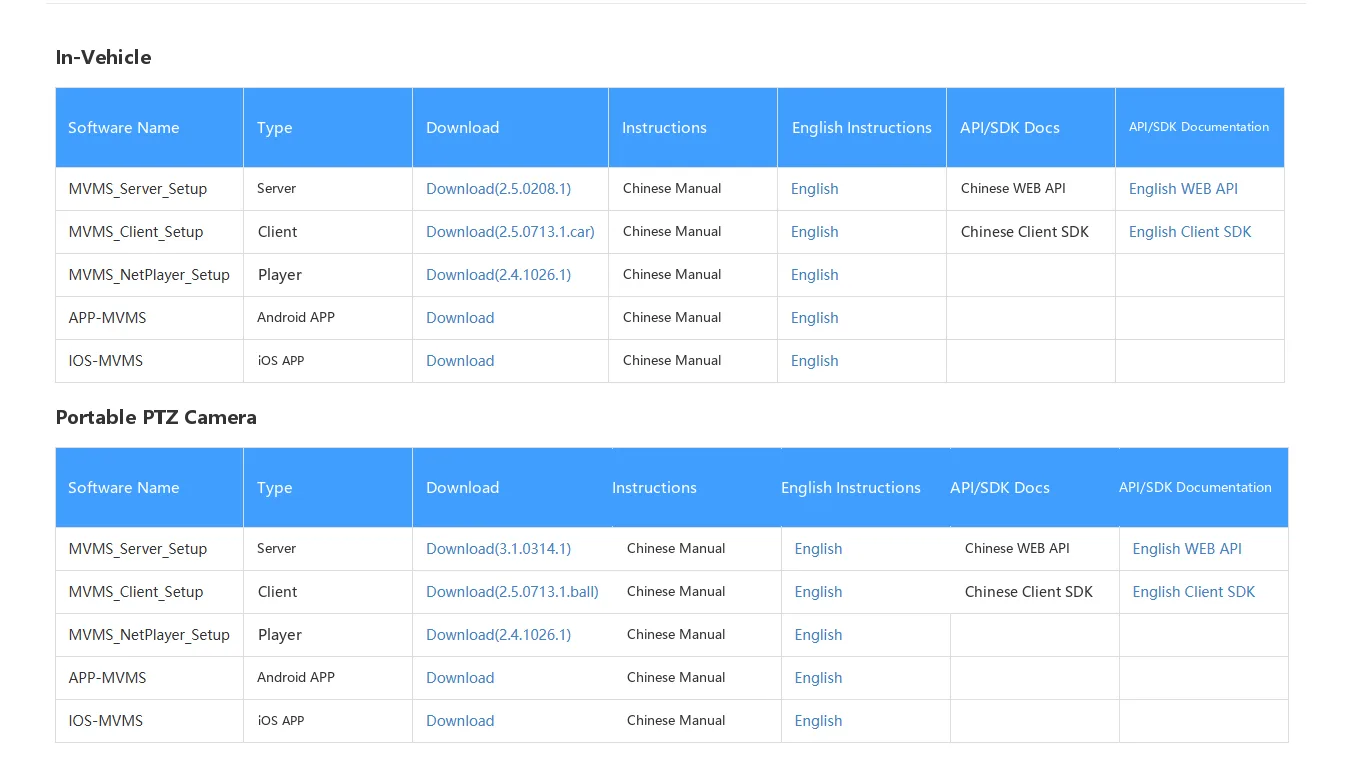
Platform software download link

← 上一篇API - Plug-in Parameter Setting Interface 下一篇 →Windows installation and uninstallation
Contact the Author

If you have any suggestions or questions about this article, please feel free to contact the author. We are happy to help. If you would like to learn more about our in-vehicle video recorder (MDVR) products, please feel free to contact the author as well.

✉ Email: [email protected] ☎ Phone: +86 18682037629
Friendly Links
citops.commdvr.aiptzdome.cnpixconvert.cn
Site
About
✕