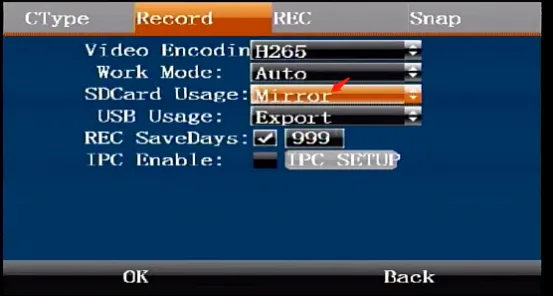
Prerequisites:
- Display, remote control, storage media (SD card, hard disk, etc.)
SD card mode description:
Hard disk + single card model (M51HV series)
Mirror recording: Hard disk records main stream, SD card records sub-stream Loop recording: Hard disk and SD card record main stream in a loop Missing recording: SD card records main stream when hard disk does not exist, otherwise SD card does not record No recording: Hard disk records main stream, SD card does not record
Hard disk + dual card model (M32HV series)
Mirror recording: hard disk or SD1 card records main stream (when both hard disk and SD1 card exist, otherwise the one that exists will record the main stream), SD2 card records sub stream Loop recording: hard disk and SD1 card and SD2 card loop recording main stream Missing recording: when hard disk and SD1 card do not exist, SD2 card records main stream, otherwise SD2 card does not record No recording: hard disk or SD1 card records main stream (when both hard disk and SD1 card exist, otherwise the one that exists will record the main stream), SD card does not record
Dual card model (M16HV/M20HV.)
Mirror recording: SD1 card records main stream, SD2 card records sub stream Loop recording: SD1 card and SD2 card loop recording main stream Missing recording: when SD1 card does not exist, SD2 card records main stream, otherwise SD2 card does not record No recording: SD1 card records main stream, SD card does not record ps: SD1 described above SD2 card refers to the card slot position. Usually the card slot will be marked with SD1 2 silk screen. If there is no mark or the silk screen is damaged, please distinguish SD1 SD2 cards from left to right and from top to bottom. You can also turn the page left and right after the device is turned on to see the storage status.
Operation steps
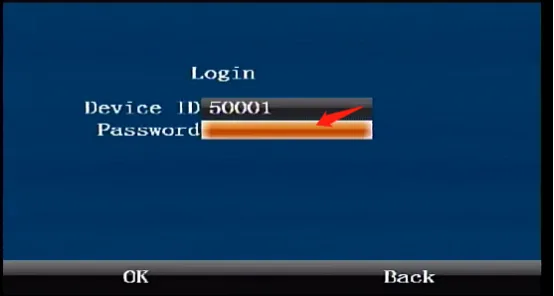
Press the remote control [ENTER] key to enter the login interface, enter the password "999999", and automatically log in to the main menu
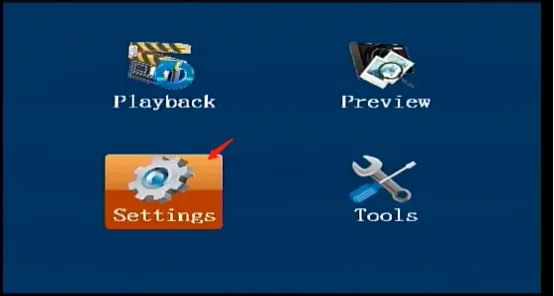
Select [Settings] in the main menu interface and press the "ENTER" key to enter the settings interface
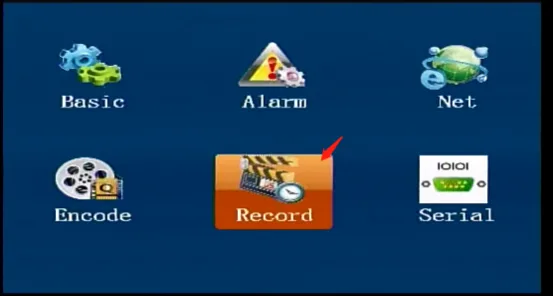
Select [Record] in the [Settings] interface, and press the "ENTER" key to enter the recording settings interface
Select [Record] in the [Recording Settings] interface to enter the recording interface, select the desired mode for the SD card usage, and press OK to save and take effect.