Prerequisites
Remote control configuration:
- A usable remote control, a normal display screen
- A usable SIM card, a 4G antenna
WEB configuration:
- A matching network port adapter, a network cable and a computer that can be accessed in the same LAN, a computer
- Or the device has WiFi and is connected to the same LAN and can be accessed, a computer
- A usable SIM card, a 4G antenna
Note:
- In China, non-VPN cards basically do not need to be set separately, and the factory default values can be used directly.
- VPN cards need to first find the SIM card operator to obtain dial-related parameters, such as authentication type and APN access point, account, and password.
- Note: After the SIM card is inserted into the device, the device lock needs to be in the locked state.
Operation steps
Use the remote control display menu configuration
Connect the device to the display, insert the SIM card, connect the 4G antenna (if you don’t know the location, refer to the "Interface Status Definition" column above), and power on.
Use the remote control ENTER to enter the device network settings menu, as follows


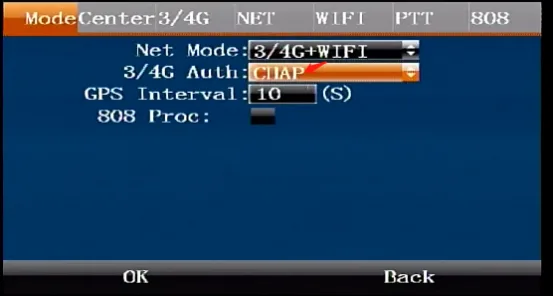
Dial-up authentication mode, the device factory authentication mode is CHAP, if the SIM card dial-up authentication is PAP, Then you need to modify it, as shown in the figure below
Modify the dialing parameters, such as APN and other information, and use the ENTER and up and down keys on the remote control to switch to the item column that needs to be modified
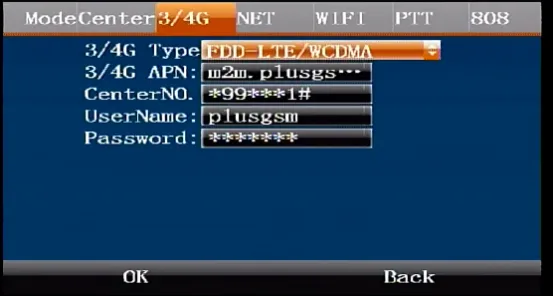
ps: The default login password for the menu is 999999. After modification, make sure to click the menu to send the OK button to save. The modification of the dialing parameters takes effect immediately and does not require restarting the device.
Use the device Web to configure dial-up parameters
Use a wired or WIFI network to connect the device
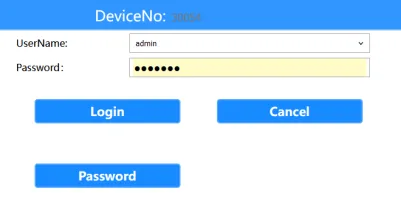
Use a browser to log in to the WEB system of the device IP. For example, if the device IP is 192.168.1.173, enter the browser address bar: http://192.168.1.173, default password: Adm_123
Enter the general settings, click the network settings menu, click the network mode menu drop-down item, select the SIM card dial-up authentication mode, the device factory authentication mode is CHAP.
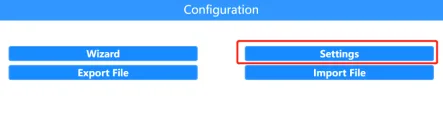
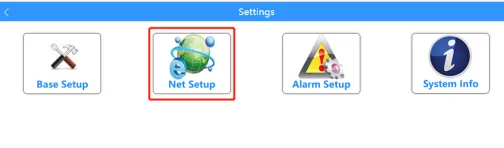
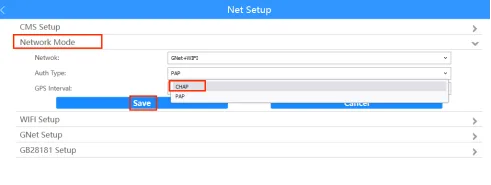
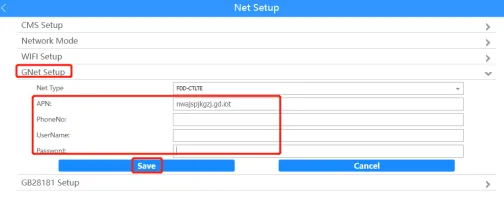
- Click the GNet settings menu drop-down item, set the SIM card dial-up parameters, enter the corresponding parameters according to the actual SIM card dial-up parameters, click Save, and the dial-up parameters will take effect immediately after saving, without restarting the device.