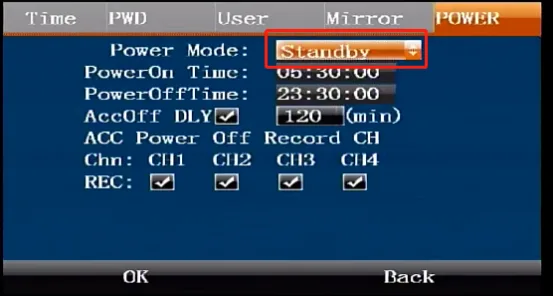
Prerequisites
- A usable remote control and normal display screen
Operation steps
Enter the main menu function interface, operate the direction keys and ENTER key of the remote control, and enter the settings-basic settings-power on/off menu


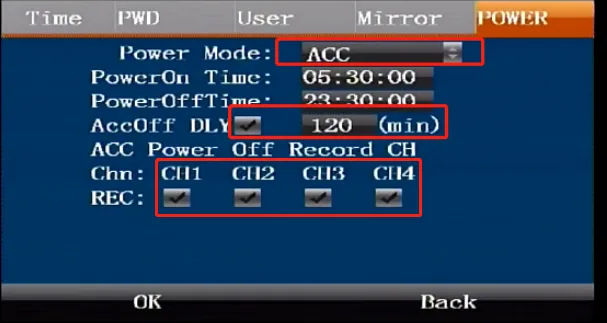
Select "Ignition Mode," check the "Power-off Delay" checkbox, enter the desired delay duration (range: 0–65535 minutes), and configure which cameras remain active during the ACC disconnection delay period. ps: The vehicle ACC ignition device is turned on and works, and the ACC disconnection device is turned off. For wiring, refer to "Power line wiring installation" Ignition mode schematic diagram introduction.
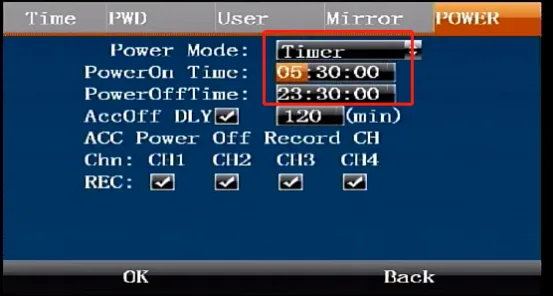
- Select "Timer Mode" and enter the scheduled start time and shutdown time ps: Wiring reference "Power Cord Wiring Installation" Timer Mode Schematic diagram introduction
- Select "Ignition off mode" to support waking up and starting the machine for a period of time in the shutdown state due to collision and other situations (not yet implemented)