Prerequisites
Remote control configuration:
- Available remote control, normal display screen
- Available SIM card, 4G antenna
WEB configuration:
- Matching network port adapter, network cable and computer in the same LAN, computer
- Or the device has WiFi and is connected to the same LAN, computer
- Available SIM card, 4G antenna
Note:
- IMEI is the International Mobile Equipment Identity, that is, the identification code of the wireless module.
- ICCID is the integrated circuit card identification code, that is, the SIM card number.
- Note: After the SIM card is inserted into the device, the device lock needs to be in the locked state.
Operation steps
Use the remote control display menu configuration
Connect the device to the display, insert the SIM card, and power on.
Use the remote control to press LOGIN
 and DOT
 at the same time button, the display screen will enter the test status display page, as shown below:
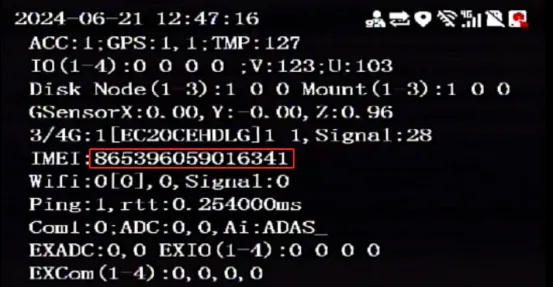
Note: Currently the display screen does not support the acquisition and viewing of ICCID information.
View using device Web information
Connect the device using a wired or WIFI network
Use a browser to log in to the WEB system of the device IP. For example, if the device IP is 192.168.1.173, enter http://192.168.1.173 in the browser address bar. Default password: Adm_123
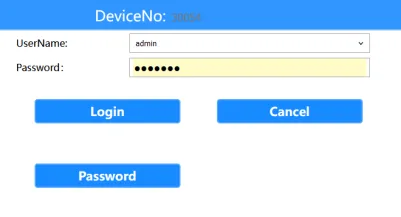
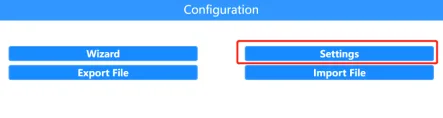
Enter General Settings, click System Information, and click GNet Module Information Check the IMEI number and ICCID of the current device

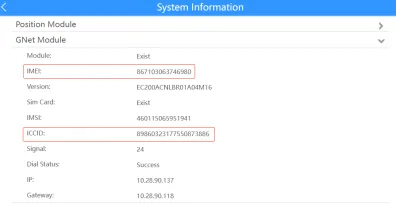
Note: To obtain the above information, you need to insert a SIM card. If the device is still dialing, the above information needs to be updated by manually refreshing the web page.