Introduction
This chapter will introduce the definition of the rear panel interface and front panel slot of our vehicle-mounted MDVR series!
M15HV interface definition:
Back panel
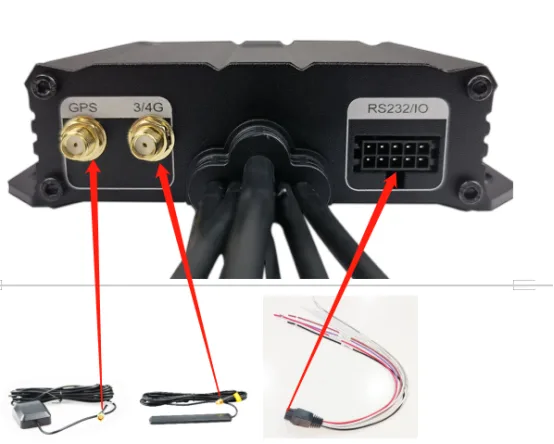
Instructions: The two on the left are GPS and 3/4G antenna sockets. Use the matching GPS and 3/4G antennas to insert and tighten clockwise. The right side is the RS232/IO socket. Use the matching IO harness with the notch facing down and press the buckle below to insert, as shown above.
Front panel
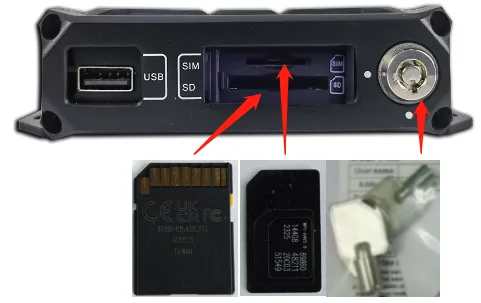
Instructions: The right side is the switch lock. Use the matching key with the notch facing down and gently press it. Insert it clockwise to the horizontal notch on the left to unlock it. Push the door to the left. The upper SIM card slot uses the large card notch to the right. The lower SD card slot uses the SD card notch to the right. After completion, push the door to the right to close it and use the key to turn it counterclockwise to the vertical port to lock it. The left side is the USB port for inserting media such as U disk to upgrade firmware, import configuration, etc., as shown above.