How to trigger an alarm on the device?
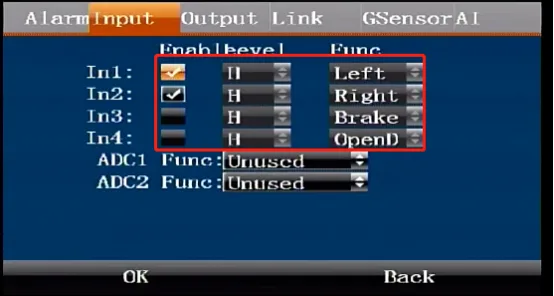
In addition to the alarm triggered by the internal detection of the device, such as no hard disk, SD card or camera plugged in, etc.; the device can also trigger an alarm through external force, such as IO, Gsensor, ADAS, DSM, etc. Here we will talk about the most commonly used IO input to trigger an alarm on the device; Enter the device menu Settings>Alarm Settings>Input The specific setting interface is as shown below; For example, if I want to trigger a brake alarm, then check the enable of input 3, connect the device to the serial port cable, find the line marked SENSOR-IN3, and connect it with the red 5V or 12V line to trigger the alarm; In the actual vehicle installation environment, please connect the SENSOR-IN line and the vehicle signal line together
What can be done after the alarm is triggered?
The alarm information uploaded by the device can be seen on the platform. The platform will generate statistical reports based on the alarm information. Alarm linkage can be performed on the platform or on the device. The following is the alarm linkage function of the device:
How to capture and record the channel after the alarm is triggered?
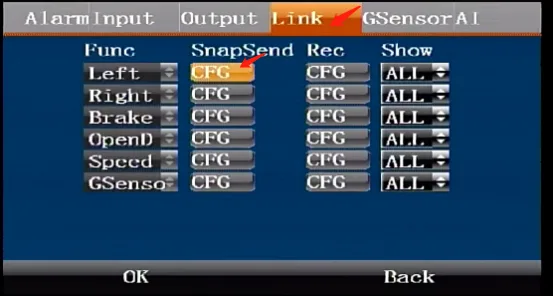
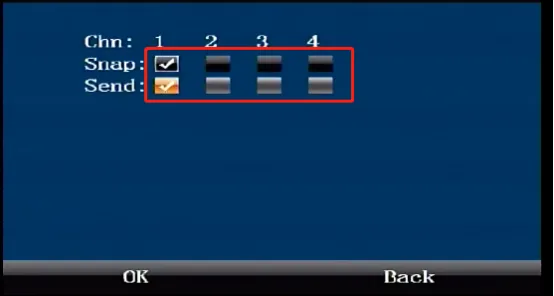
If the function of input 3 brake is enabled in the above steps, then in the linkage menu, the snapshot configuration and video configuration of the brake and the displayed channel can be configured accordingly. As shown in Figure 2 below, enter the snapshot upload configuration menu, you can select the channel to be captured, and upload the picture to the platform channel after the capture. The same is true in the video configuration menu; the function of the display is to make a certain channel full screen on the vehicle display when the alarm is triggered. For example, if you want to make the reversing image function, the camera of channel three is installed at the rear of the vehicle, then you can check the alarm input, select display CH3 accordingly in the linkage, connect the alarm input line and the reversing signal line together, and when the vehicle is reversing, the image of channel three will be full screen on the vehicle display Surface
How to configure remotely?
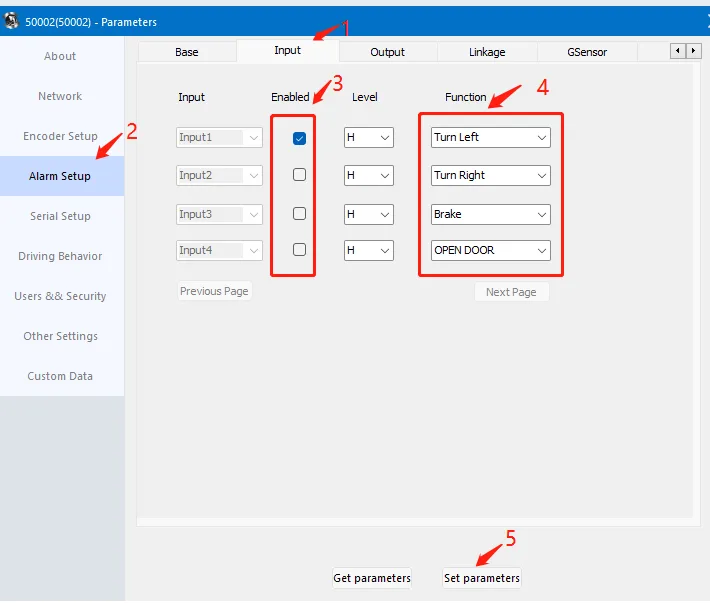
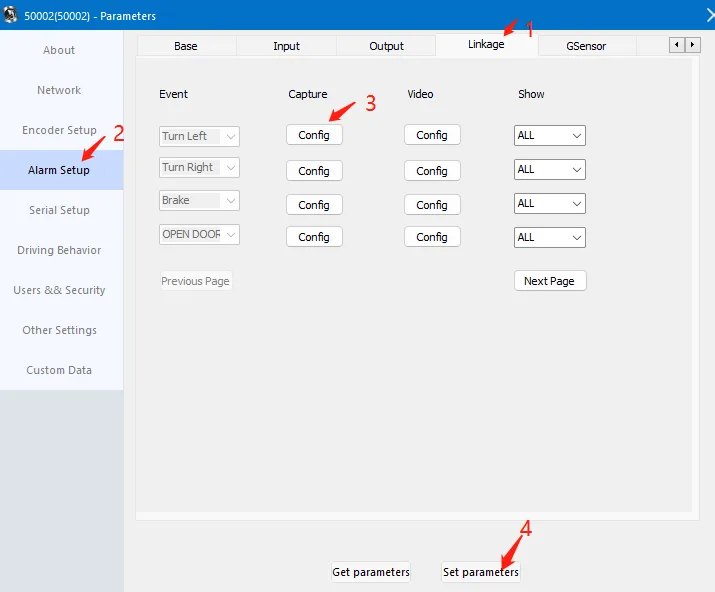
Click "Alarm Settings";
Click "Input";
Check the corresponding enable;
Select high level or low level trigger;
Select the corresponding function
After setting, remember to click "Set Parameters";
Click " Linkage";
Set up snapshot and video recording;
Select the channel to be captured and recorded during linkage, and check whether to send it to the platform;
Select the channel to be displayed when triggered;
After configuring the parameters, click "Set Parameters";
Alarm recording duration configuration:
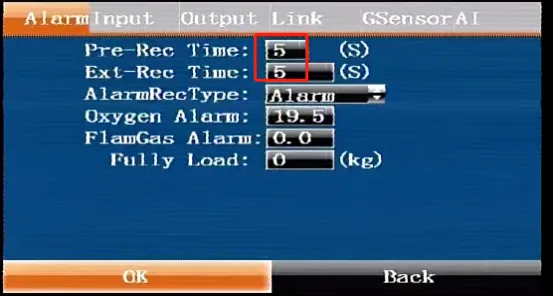
Pre-recording duration: When the alarm is triggered, the video file of the previous number of seconds will be used as the alarm video; Delayed recording duration: When the alarm is triggered, the video file of the next number of seconds will be used as the alarm video. An alarm video file consists of these two parts