Installation list
| Name | Quantity | Name | Quantity |
|---|---|---|---|
| MDVR AI device | 1 | MDVR 485 IO harness | 1 |
| Remote controller | 1 | Display | 1 |
| Sound and light alarm | 1 | Common wiring tools | n |
Necessary instructions
The sound and light alarm is used in conjunction with the MDVR AI device to trigger the BSD alarm, so the device itself must support the AI BSD function and configure related parameters to trigger the alarm.
Generally, the MDVR 485 IO wiring harness will be made into an aviation connector for direct insertion before shipment. If there is no need to remove the wiring, it can be used to connect the 4 serial ports of the device and the alarm. For details, please refer to the Detailed definition of aviation header pins
Currently, there are two models and four models for shipment. To distinguish between Chinese and English prompts, you must distinguish the language version when placing an order. The details are as follows: MX-SL-02-CH: Model A, Chinese MX-SL-02-EN: Model A, English MX-SL-CH-B-003: Model B, Chinese MX-SL-EN-B-003: Model B, English
Here, the MX-SL-CH-B-003 sound and light alarm is taken as an example. The device menu configuration parameters are the same. For details, see the "Model Corresponding Configuration Parameter Table" below. Model corresponding configuration parameter table
| Model | Serial port index | Serial port function | Protocol type | Baud rate |
|---|---|---|---|---|
| MMX-SL-CH-B-003 | RS485 | AlarmOut | Default | Default |
Actual picture:
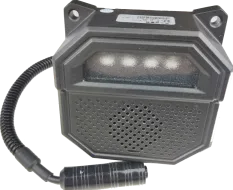
MX-SL-CH-B-003, MX-SL-EN-B-003
Operation steps
1. Wiring
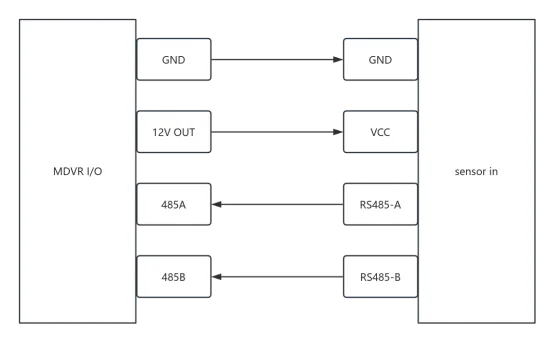
2. Device menu configuration
Remote control to enter menu>>Settings>>Serial port settings>>Serial port, serial port index configuration RS485, serial port function AlarmOut, other parameters default, confirm save restart device to take effect.
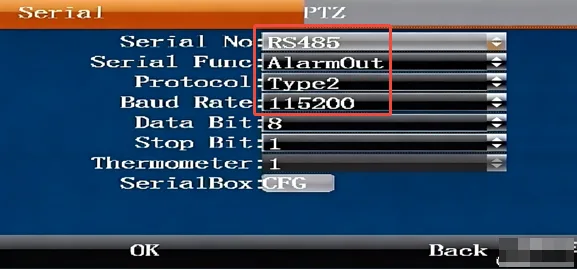
3. Alarm test
After restarting, trigger any BSD alarm to link the sound and light alarm to sound and light alarm. For the AI BSD alarm function, refer to Active Safety AI Local Remote Control Configuration