This chapter introduces the "data downlink transparent transmission" protocol function extended by the 808 standard. The following is the description of the "Tongtianxing" platform. Other platforms that support the extension are similar. Find the downlink transparent transmission window and fill in the data type and parameter configuration to be sent!
Operation steps:
Register the device on the standard 808 protocol Tongtianxing platform
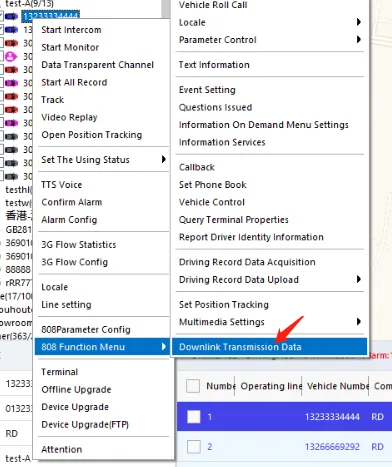
Right-click and select "808 Function Menu" →→→ "Data Downlink Transparent Transmission"
Enter "242" for the transparent transmission message type
Enter the parameter parameter command to be sent for the transparent transmission message content, such as copying the following restart command to send, and other commands refer to the Common Configuration Parameter Command article
<VariCfgSec Action="DEVICE_REBOOT"></VariCfgSec>
- Check the status in the operation result column to see if the setting is successful
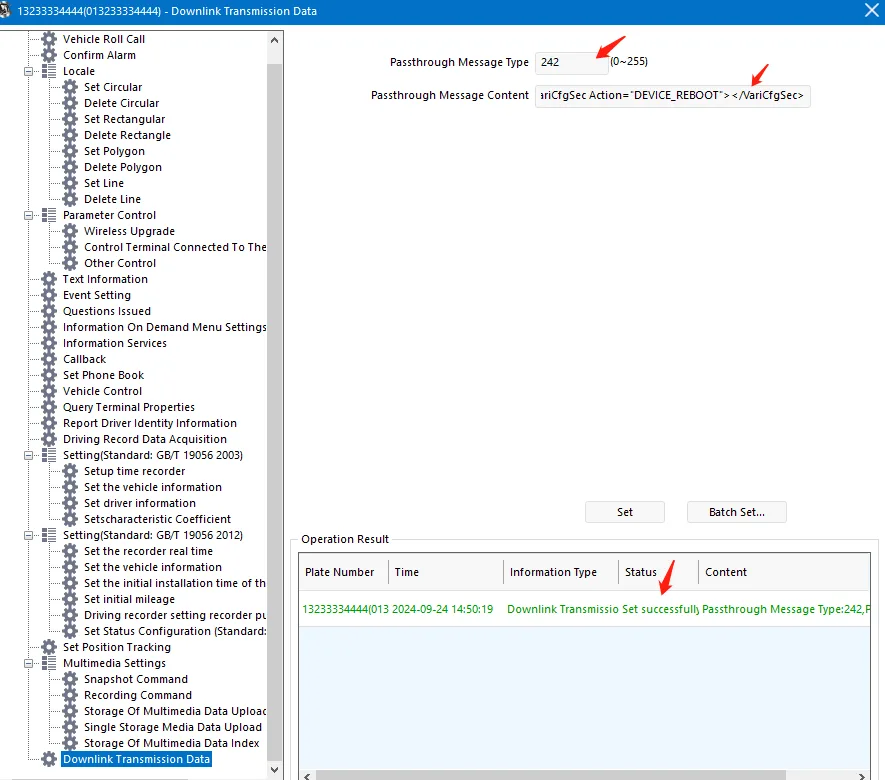
Note: 808 downlink transparent transmission only supports parameter sending configuration, and the return value after configuration cannot be seen. After the sending is successful, other methods need to be used to verify whether the configuration function is successful.