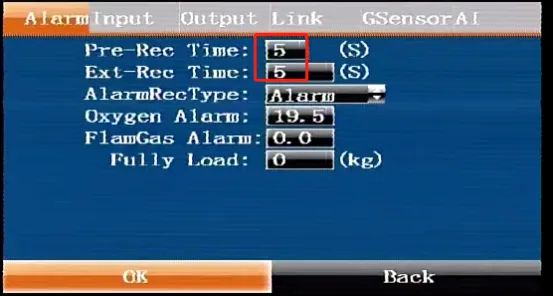
Prerequisites:
- Display screen, remote control, storage media (SD card, hard disk, etc.)
Alarm duration description:
- Alarm pre-recording duration: the time from the moment the alarm occurs to the moment the alarm occurs, that is, the alarm recording start time
- Alarm delay duration: the time from the moment the alarm occurs to the moment the alarm occurs, that is, the recording alarm end time
- Alarm recording duration = alarm pre-recording duration + alarm delay duration. For example, if the device triggers an alarm at 12:01:00, the configured alarm pre-recording duration and alarm delay duration are 30s respectively. The alarm recording start time is 12:00:30 and the end time is 12:01:30, and the recording duration is 1 minute
- This configuration applies to all types of alarm recording durations of the device, such as AI, IO..
Operation steps
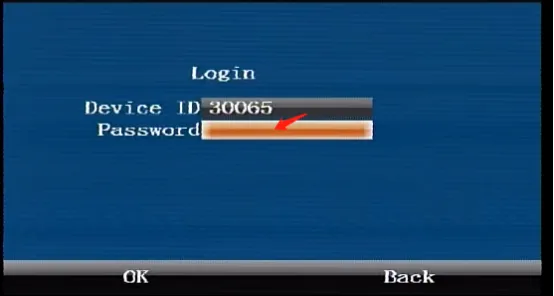
Press the [ENTER] button on the remote control to enter the login interface, enter the password "999999", and automatically log in to the main menu
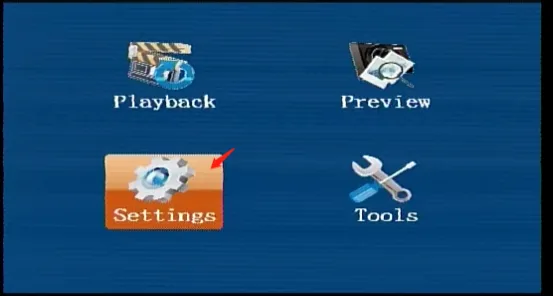
Select [Settings] on the main menu interface and press the "ENTER" button to enter the settings interface
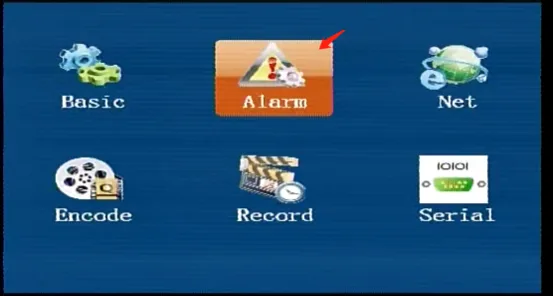
Select [Settings] in the [Alarm] interface and press the "ENTER" key to enter
Press the "ENTER" key on the default first page [Alarm ] to enter the editing state. If it is not on the first page [Alarm ], press the left and right arrow keys to move to this page, press the remote control down key to move to the "Alarm Pre-recording Duration" and "Alarm Delayed Recording Duration" input boxes to fill in the duration, confirm and save, and restart to trigger the alarm to take effect.