Prerequisites
- Display screen, remote control, storage media (SD card, hard disk, etc.)
Rule description:
- Supports snapping pictures of specified video channels at fixed intervals
- The captured channel pictures are saved in the second partition pic directory of the storage medium, one directory per day, such as 2024-06-03 directory name
- The captured video channel pictures are named in this format 30065_235247_369-3.jpg, where 30065 is the device ID, the following 235247 is the capture time of the day, 369 is milliseconds or other specific event number values, and 3 represents the channel number
- Considering the size of the disk partition space, the device will automatically detect the remaining space of the partition every 5 minutes. If the remaining space is less than 15%, the oldest video of the day will be automatically deleted during the current detection, and it will be detected again after 5 minutes
- The device supports automatic deletion of historical snapshots in the disk that exceed the device configuration image storage days
Operation steps
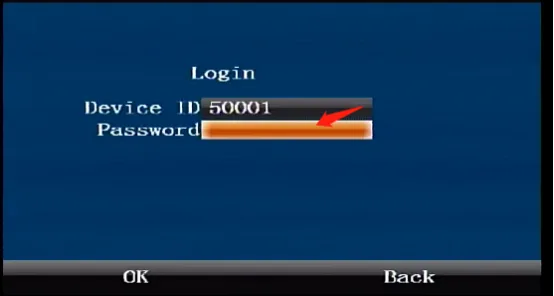
Press the remote control [ENTER] key to enter the login interface, enter the password "999999", and automatically log in to the main menu
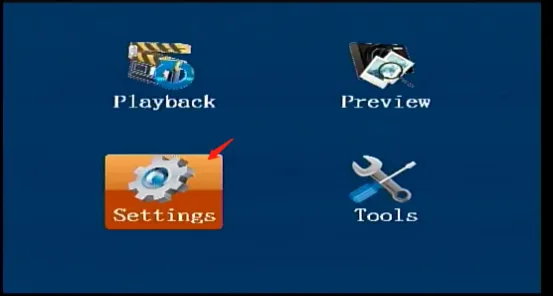
Select [Settings] on the main menu interface and press the "ENTER" key to enter the settings interface
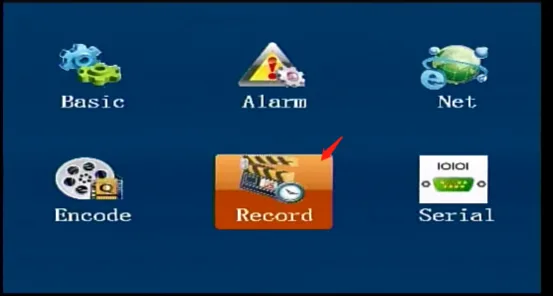
Select [Record] in the [Settings] interface and press the "ENTER" key to enter the recording settings interface
Press the right arrow key to come to the Snapshot settings interface, press the "ENTER" key to enter the editing state, check the Scheduled Snapshot checkbox to enable the snapshot function, fill in the snapshot interval, number of days to save, and resolution, check the snapshot channel and upload platform channel, and confirm to save to take effect immediately.
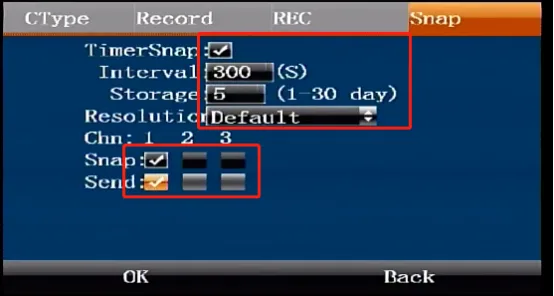
ps: The number of days to save this configuration item will only take effect when there is enough disk space. Otherwise, it will be deleted in advance according to the above rules when the disk space is less than 15%; The default resolution "Default" is the default main stream encoding resolution, and 1080P/720P/960H resolution can be configured separately; The picture capture and upload are on the CMSV7 platform.