Log in to the platform client, select the vehicle that needs to be configured, click "Parameter Configuration">>"Custom Data", copy the parameters in the input box and click "Set Parameters" as shown below:
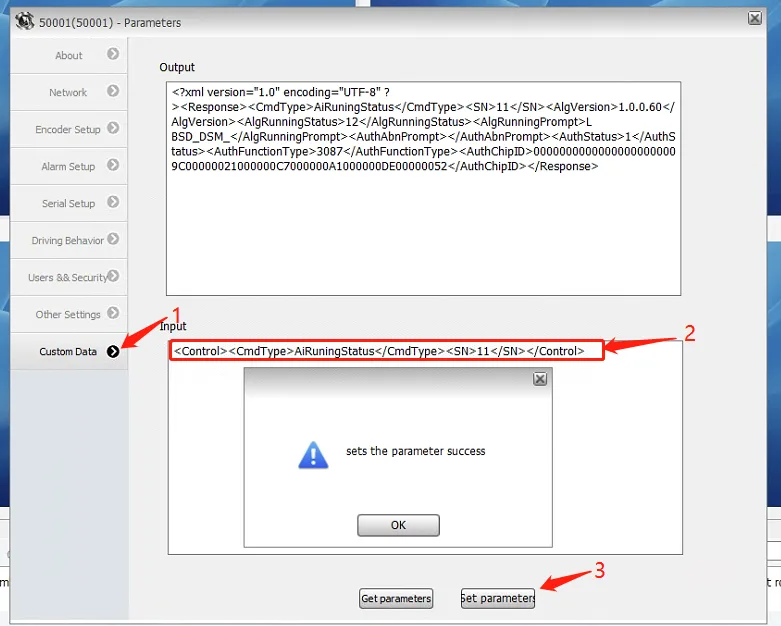
Description of common parameters:
1.AI authorization query
<Control><CmdType>AiRuningStatus</CmdType><SN>11</SN></Control>
Return value description: "AlgRunningStatus" AI function running status: ADAS=1,R BSD=2,DSM=4,ADAS+DSM=5,ADAS+DSM+R BSD=7 "AuthStatus" AI authorization status: 0 Unauthorized 1 Authorized "AuthFunctionType" AI uses authorization type: ADAS=1,R BSD=2,DSM=4,ADAS+DSM=5,ADAS+DSM+R BSD=7
2.Basic configuration query of algorithm functions
<VariCfgSec Action="DEVICE_QUERY"><stAIModules></VariCfgSec>
Return value description: "ucFD_TestMode" AI operating mode: 0 Driving mode 1 Test mode "ucFD_AdasEnable" ADAS function: 0 off 1 on; ucFD_AdasChn ADAS associated channel box: 0 CH1 channel, 1 CH2 channel, 2 CH3 channel, 3 CH4 channel, 4 CH5 channel, 5 CH6, 6 CH7, 7 CH8 Note: When ADAS, DSM, BSD and other functions are associated with channel boxes, please do not have duplicate channels, otherwise they will be invalid. "ucFD_RightBsdEnable" Right BSD function: 0 off 1 on; ucFD_RightBsdChn associated channel box: 0 CH1 channel, 1 CH2 channel, 2 CH3 channel, 3 CH4 channel, 4 CH5 channel, 5 CH6, 6 CH7, 7 CH8 "ucFD_LeftBsdEnable" Left BSD function: 0 off 1 on; ucFD_LeftBsdEnable associated channel box: 0 CH1 channel, 1 CH2 channel, 2 CH3 channel, 3 CH4 channel, 4 CH5 channel, 5 CH6, 6 CH7, 7 CH8 "ucFD_DsmEnable" DSM function: 0 off 1 on; ucFD_DsmChn associated channel box: 0 CH1 channel, 1 CH2 channel, 2 CH3 channel, 3 CH4 channel, 4 CH5 channel, 5 CH6, 6 CH7, 7 CH8 ucFD_FishEyeBsdEnable front BSD function: 0 off, 129 F BSD non-fish eye BSD; 1 F BSD fish eye BSD; ucFD_FishEyeBsdChn associated channel box: 0 CH1 channel, 1 CH2 channel, 2 CH3 channel, 3 CH4 channel, 4 CH5 channel, 5 CH6 , 6 CH7, 7 CH8 ucFD_FEyeEBsdEnable Post-BSD function: 0 off, 129 F BSD non-fisheye post-BSD; 1 F BSD fish-eye post-BSD; ucFD_FEyeEBsdChn associated channel box: 0 CH1 channel, 1 CH2 channel, 2 CH3 channel, 3 CH4 channel, 4 CH5 channel, 5 CH6, 6 CH7, 7 CH8
3.Basic configuration of AI algorithm function
<VariCfgSec Action="DEVICE_SET"><stAIModules ucFD_TestMode="0" ucFD_AdasEnable="1" ucFD_AdasChn="0" ucFD_RightBsdEnable="0" ucFD_RightBsdChn="1" ucFD_DsmEnable="1" ucFD_DsmChn="2" ucFD_LeftBsdEnable="0" ucFD_LeftBsdChn="3" ucFD_FishEyeBsdEnable="0" ucFD_FishEyeBsdChn="0" ucFD_FEyeEBsdEnable="0" ucFD_FEyeEBsdChn="1"/></VariCfgSec>
Parameter definition reference 2 AI algorithm function basic configuration query return value description
4.Set filtering AI alarm events
<VariCfgSec Action="DEVICE_SET"><stAIModules uiFD_EventFilter="0"/></VariCfgSec>
For multiple alarm filters, just add the following values: EVENT_NONE = 0, //No alarm EVENT_LDW_LEFT = 1, //Left lane departure alarm EVENT_LDW_RIGHT = 2, //Right lane departure alarm EVENT_FCW = 4, //Front vehicle collision alarm EVENT_PCW = 8, //Pedestrian collision alarm EVENT_HMW = 16, //Vehicle distance monitoring alarm EVENT_CROSS_WALK = 32, //Crosswalk detection alarm EVENT_BLIND = 64, //Right blind zone alarm EVENT_SMOKE = 128, //Smoking EVENT_CALL = 256, //Call EVENT_YAWN = 512, //Yawn EVENT_NO_ALIGNMENT = 1024, //Misalignment (off seat) EVENT_CAMERA_SHIELD = 2048, //Camera shielding EVENT_ABNORMAL_IDENTITY = 4096, //Abnormal identity (not the original driver) EVENT_ABSENT_DRIVER = 8192, //Abnormal driving (face not detected) EVENT_EYES_MASKED = 16384, //Blocking sunglasses EVENT_MOUTH_MASKED = 32768, //Mouth mask EVENT_EYE_CLOSING = 65536, //Close eyes EVENT_SWINGING_LEFT = 131072, //Distracted driving (Dong Zhang) EVENT_SWINGING_RIGHT = 262144, //Distracted driving (looking west) EVENT_HEAD_UP = 524288, //Distracted driving (looking up) EVENT_HEAD_DOWN = 1048576, //Distracted driving (lowering head) EVENT_NORMAL_IDENTITY = 2097152, //Identity is normal EVENT_ABNORMAL_BELT = 4194304, //Not wearing a seat belt EVENT_ABNORMAL_HAND = 8388608, //hands off the steering wheel EVENT_ABNORMAL_PHONE = 16777216, //Play on mobile phone EVENT_ABNORMAL_OVERBOARD = 33554432//Overboard
5.AI specific function alarm detailed parameter query
//Query DSM parameters
<VariCfgSec Action="DEVICE_QUERY"><stAIThresParam StartChn ="1"></VariCfgSec>
//Query ADAS parameters
<VariCfgSec Action="DEVICE_QUERY"><stAIThresParam StartChn ="2"></VariCfgSec>
//Query BSD parameters
<VariCfgSec Action="DEVICE_QUERY"><stAIThresParam StartChn ="3"></VariCfgSec>
Return value notes: fFD_DsmLowVel; DSM alarm speed threshold, unit km/h, default 30 fFD_DsmHighvel; DSM alarm high speed threshold, unit km/h, default 50s fFD_LeftLookLowvel; Left bias low speed duration (2.0 - 40.0) seconds, default 4s fFD_LeftLookHighVel; Left bias high speed duration (2.0 - 40.0) seconds, default 3s fFD_RightLookLowVel; Right bias low speed duration (2.0- 40.0) seconds, default 4s fFD_RightLookHighvel; Left bias high speed duration (2.0 - 40.0) seconds, default 3s fFD_HeadUpLowVel;Head-up low speed duration (2.0 - 40.0) seconds, default 4s fFD_HeadUpHighvel;Head-up high speed duration (2.0 - 40.0) seconds, default 3s fFD_HeadDownLowvel;Head-up low speed duration (2.0 - 40.0) seconds, default 4s fFD_HeadDownHighvel;Head-up high speed duration (2.0 - 40.0) seconds, default 3s //Interval time of similar alarm events nFD_DistractedInt;Interval time of driver distraction alarm (>=3) seconds Default 30s nFD_CrossWalkInt; Pedestrian crossing alarm time interval (>=3) seconds, default 30s nFD_BsdFWarnInt nFD_BsdSWarnInt nFD_BsdTWarnInt //BSD three levels of alarm interval nFD_LdwDistance; Left and right lane line distance alarm threshold, unit cm (range: -20cm~-20cm, crossing the lane line is negative) -5 fFD_LeftLookAngel; Driver left deviation angle (15 ~ 90) degrees, default 30 fFD_RightLookAngel; Driver right deviation angle (15 ~ 90) degrees, default 30 Default 45 fFD_HeadUpAngel; Driver head up angle (15 to 90 degrees), default 25 fFD_HeadDownAngel; Driver head down angle (1 to 90 degrees), default 15 //ADAS threshold fFD_Hmwvel; HMW alarm speed threshold, unit km/h 30.00 fFD_Fcwvel; FCW alarm speed threshold, unit km/h 30.00 fFD_Ldwvel; LDW alarm speed threshold, unit km/h 55.00 fFD_Pcwvel; PCW alarm speed threshold, unit km/h 50.00 //BSD threshold float fFD_BsdFirstLowVel; BSD level 1 alarm speed threshold, unit km/h default 5.00 float fFD_BsdSecondLowVel; BSD level 2 alarm speed threshold, unit km/h default 5.00 float fFD_BsdThirdLowVel; BSD level 3 alarm speed threshold, unit km/h default 5.00 float fFD_BsdFirstHighVel; BSD level 1 alarm maximum speed threshold, unit km/h default 0 float fFD_BsdSecondHighVel; BSD level 2 alarm maximum speed threshold, unit km/h default 0 float fFD_BsdThirdHighVel; BSD level 3 alarm maximum speed threshold, unit km/h default 0 BSD speed threshold rules are: fFD_BsdFirstLowVel (low) default 5 fFD_BsdFirstHighVel (High) Default value 0 fFD_BsdFirstHighVel (High) ≤ fFD_BsdFirstLowVel (Low) Example 0≤5 Enable low speed value fFD_BsdFirstHighVel (High) > fFD_BsdFirstLowVel (Low) Example fFD_BsdFirstHighVel 30 >5, enable high speed and low speed range value, i.e. 30-5 speed range Levels 1, 2 and 3 all follow this rule
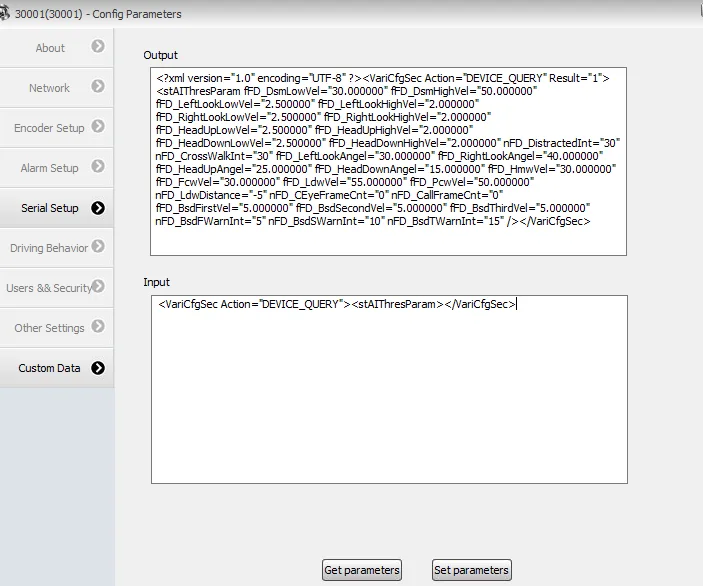
6.AI specific function alarm detailed parameter configuration
<VariCfgSec Action="DEVICE_SET">
<stAIThresParam fFD_DsmLowVel="30.000000" fFD_DsmHighVel="50.000000" fFD_LeftLookLowVel="4.0 00000" fFD_LeftLookHighVel="3.000000" fFD_RightLookLowVel="4.000000" fFD_RightLookHighVel="3 .000000" fFD_HeadUpLowVel="4.000000" fFD_HeadUpHighVel="3.000000" fFD_HeadDownLowVel="4.000000" fFD_HeadDownHighVel=" 3.000000 "NFD_DISTRACTINTINT =" 30 "NFD_CROSSWALKINT =" 30 "FFD_LeFTLOOKANGEL =" 30.000000 "FFD_RIGHTLOOKANGEL =" 45.000000 "ffd_headupangel =" 25.000000 "ffd_ Headdownangel = "15.000000" ffd_hmwvel = "30.000000" ffd_fcwvel = "30.000000" ffd_ldwvel = "55.000000" ffd_pcwvel = " 50.000000" nFD_LdwDistance="-5" fFD_BsdFirstVel="5.000000" fFD_BsdSecondVel="5.0 00000" fFD_BsdThirdVel="5.000000" nFD_BsdFWarnInt="5" nFD_BsdSWarnInt="10" nFD_B sdTWarnInt="15" />
</VariCfgSec>
Parameter definition reference 5 AI specific function alarm detailed parameter query return value description
7.AI ADAS function Obtaining vanishing point coordinates
<Control><CmdType>AdasVPoint</CmdType><SN>11</SN><Mode>Get</Mode></Control>
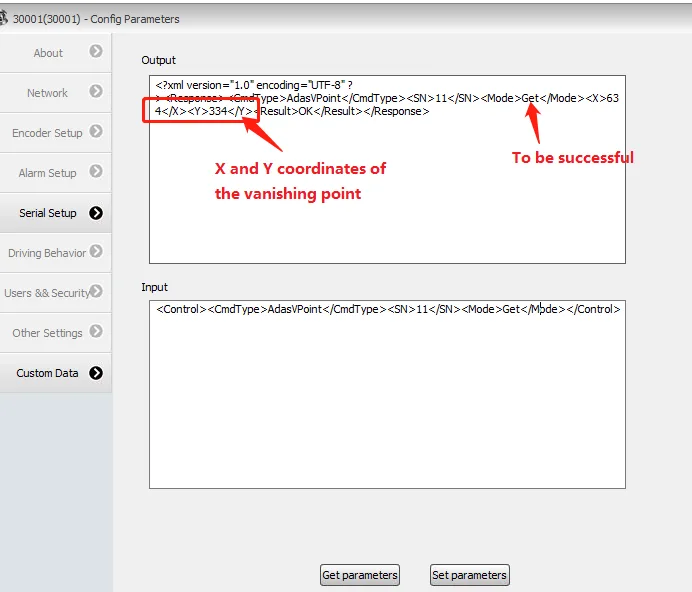
8.AI ADAS function vanishing point coordinate configuration
<Control><CmdType>AdasVPoint</CmdType><SN>11</SN><Mode>Set</Mode><X>640</X><Y>370</Y></Control>
9. Obtain AI ADAS function calibration parameters
<Control><CmdType>AdasCalibration</CmdType><SN>11</SN><Mode>Get</Mode></Control>
Return value description: fCarWidth vehicle width, unit mm fRefTop distance to the front of the car fDisLen2Tyre Distance to front wheel fCameraHeight installation height fCameraFocus lens focal length fCameraDx sensor size
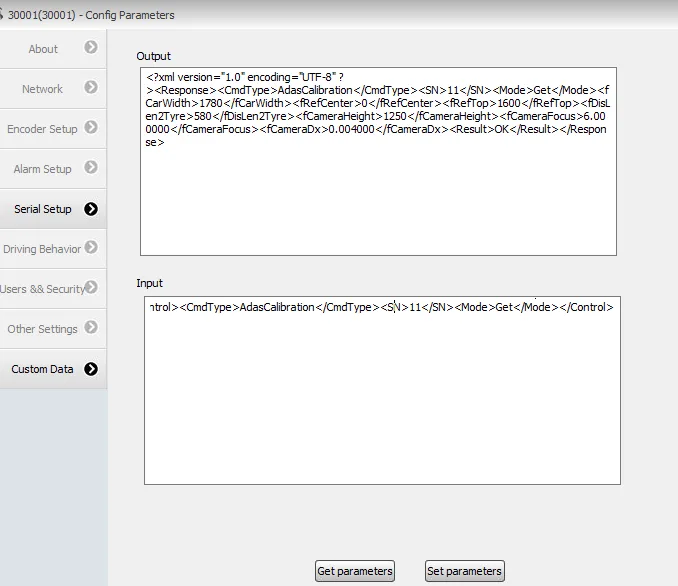
10.AI ADAS function calibration configuration
<Control><CmdType>AdasCalibration</CmdType><SN>11</SN><Mode>Set</Mode><fCarWidth>1780</fCarWidth><fRefCenter>10</fRefCenter><fRefTop>1600</fRefTop ><fDisLen2Tyre>570</fDisLen2Tyre><fCameraHeight>1300</fCameraHeight><fCameraFocus>6.000000</fCameraFocus><fCameraDx>0.004000</fCameraDx></Control>
Parameter definition reference 9 AI ADAS function calibration parameter acquisition return value description
11. Obtain AI DSM function calibration parameters
<VariCfgSec Action="DEVICE_QUERY"><stDsm></VariCfgSec>
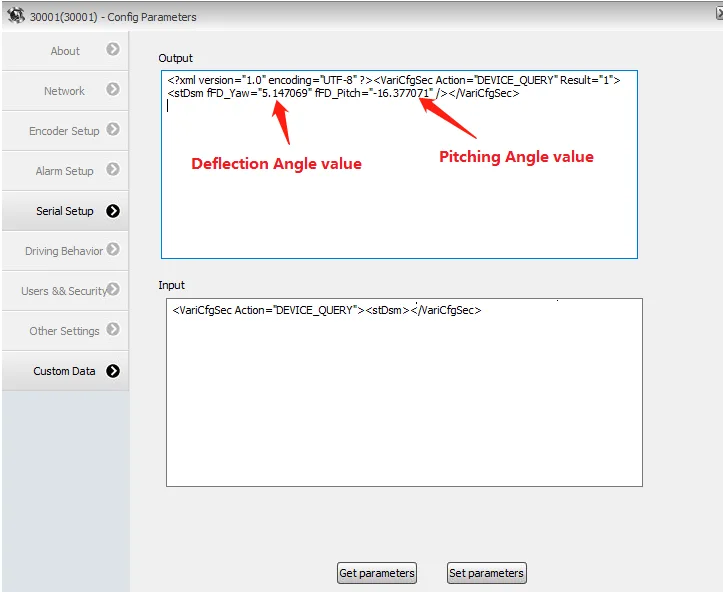
12.AI DSM function calibration parameter configuration
<Control><CmdType>DsmCalibration</CmdType><SN>11</SN><X>32</X><Y>32</Y></Control>
13. AI algorithm library parameter acquisition
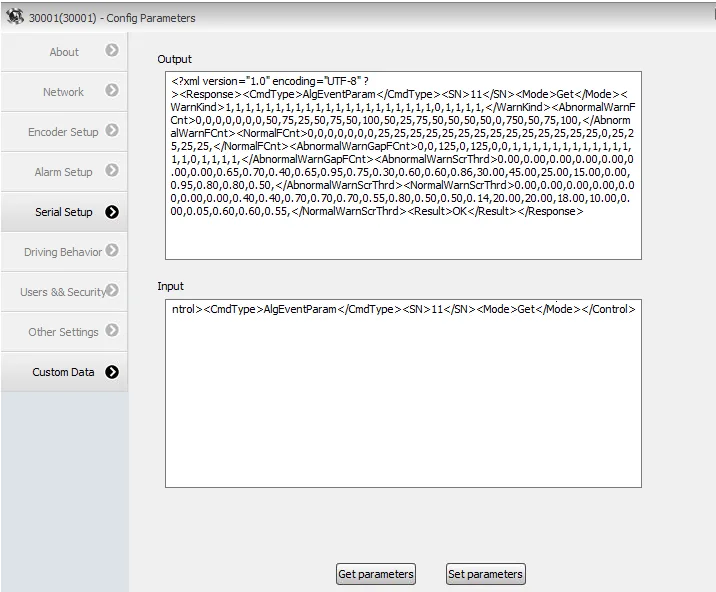
<Control><CmdType>AlgEventParam</CmdType><SN>11</SN><Mode>Get</Mode></Control>
Return value notes: Configure sensitivity and interval instructions: AbnormalWarnFCnt sets the alarm detection duration, 25 frames means 1s, 50 means 2s, some alarm cumulative frame settings correspond to the function from left to right. Refer to "4. Set filter AI alarm events" for instructions from top to bottom. Send the following parameter to configure the alarm interval
<Control><CmdType>AlgEventParam</CmdType><SN>11</SN><Mode>Set</Mode><AbnormalWarnFCnt>0,0,0,0,0,0,0,50,39,25,50,75,50,100,50,25,39,50,50,50,50,0,</AbnormalWarnFCnt></Control>
nFD_CEyeFrameCnt Set the closed eye cumulative frames to 25, i.e. 1s, 50 frames, i.e. 2s. and so on, default = 0 to enable the default value of the algorithm nFD_CallFrameCnt sets the cumulative frame number for making calls. The same rule as above, send the following parameter to configure the closed eye and calling detection duration
<VariCfgSec Action="DEVICE_SET"><stAIThresParam nFD_CEyeFrameCnt="25" /></VariCfgSec>
nFD_DistractedInt sets the DSM alarm interval (for making calls and smoking), = 5, i.e. 5s, default 30s, minimum configuration ≥ 3s, send the following parameter to configure the DSM alarm interval
<VariCfgSec Action="DEVICE_SET"><stAIThresParam nFD_DistractedInt="5" /></VariCfgSec>
14.AI algorithm library parameter configuration
<Control><CmdType>AlgEventParam</CmdType><SN>11</SN><Mode>Set</Mode><nHmwTime>1200</nHmwTime><nPcwTime>2000</nPcwTime><nFcwTime>2400</nFcwTime ><fHmwVel>30.00</fHmwVel><fFcwVel>30.00</fFcwVel><fLdwVel>55.00</fLdwVel><f PcwVel>50.00</fPcwVel><fBsdFirstVel>30.00</fBsdFirstVel><fBsdSecondVel>30.00 </fBsdSecondVel>< fBsdThirdVel>30.00</fBsdThirdVel><nLdwDistance>-5</nLdwDistance><fDsmVel>5.00</fDsmVel></Control>
15.AI algorithm library upgrade
<Control><CmdType>AiAlgUpgrade</CmdType><SN>11</SN><Alg>Motovis</Alg></Control>
16.AI authorization file deletion
<Control><CmdType>AiDelAuthKey</CmdType><SN>11</SN><Alg>Motovis</Alg></Control>
17.AI authorization information configuration
<Control><CmdType>AiSetAuthType</CmdType><SN>11</SN><Alg>Motovis</Alg><AIFunctionType>5</AIFunctionType><DynKeyVer>V1.0</DynKeyVer><AuthDynKey>testing< /AuthDynKey><OperName>yong</OperName><DynKeySvrAddr>139.9.251.220</DynKeySvrAddr><DynKeySvrPort>5999</DynKeySvrPort></Control>
Parameter definition description: AIFunctionType authorization function DynKeyVer authorized version AuthDynKey authorization key OperaName authorizer’s name DynKeySvrAddr authorization server address DynKeySvrPort Authorization service port number
18.AI ADAS alarm sub-stream video upload configuration
<VariCfgSec Action="DEVICE_SET"><stAlarmLinkage><stAlarmLinkageItem><AlarmLinkageItem_24 usAlarmRecordCh="1" usAlarmSendCh="1",usAlarmSnapCh="257"></AlarmLinkageItem_24></stAlarmLinkageItem></stAlarmLinkage></VariCfgSec>
Parameter definition description: When linking recording and uploading the first channel, usAlarmRecordCh="1" usAlarmSendCh="1", When linking recording and uploading the second channel, usAlarmRecordCh="2" usAlarmSendCh="2" When linking recording and uploading to the third channel, usAlarmRecordCh="4" usAlarmSendCh="4" When linking recording and uploading the fourth channel, usAlarmRecordCh="8" usAlarmSendCh="8" When linking recording and uploading the fifth channel, usAlarmRecordCh="16" usAlarmSendCh="16" When linking recording and uploading the sixth channel, usAlarmRecordCh="32" usAlarmSendCh="32" When linking recording and uploading the seventh channel, usAlarmRecordCh="64" usAlarmSendCh="64" When linking recording and uploading the eighth channel, usAlarmRecordCh="128" usAlarmSendCh="128"
19.AI DSM alarm sub-stream video upload configuration
<VariCfgSec Action="DEVICE_SET"><stAlarmLinkage><stAlarmLinkageItem><AlarmLinkageItem_25 usAlarmRecordCh="4" usAlarmSendCh="4",usAlarmSnapCh="1028"></AlarmLinkageItem_25></stAlarmLinkageItem></stAlarmLinkage></VariCfgSec>
Upload channel parameter definition reference 18 AI ADAS alarm sub-stream video upload channel configuration parameter comments
20.AI BSD alarm sub-stream video upload configuration
//R(right)
<VariCfgSec Action="DEVICE_SET"><stAlarmLinkage><stAlarmLinkageItem><AlarmLinkageItem_23 usAlarmRecordCh="2" usAlarmSendCh="2",usAlarmSnapCh="2056"></AlarmLinkageItem_23></stAlarmLinkageItem></stAlarmLinkage></VariCfgSec>
//L (left)
<VariCfgSec Action="DEVICE_SET"><stAlarmLinkage><stAlarmLinkageItem><AlarmLinkageItem_22 usAlarmRecordCh="8" usAlarmSendCh="8",usAlarmSnapCh="514"></AlarmLinkageItem_22></stAlarmLinkageItem></stAlarmLinkage></VariCfgSec>
//BBSD (back)
<VariCfgSec Action="DEVICE_SET"><stAlarmLinkage><stAlarmLinkageItem><AlarmLinkageItem_19 usAlarmRecordCh="16" usAlarmSendCh="16"></AlarmLinkageItem_19></stAlarmLinkageItem></stAlarmLinkage></VariCfgSec>
//FBSD (front)
<VariCfgSec Action="DEVICE_SET"><stAlarmLinkage><stAlarmLinkageItem><AlarmLinkageItem_20 usAlarmRecordCh="32" usAlarmSendCh="32"></AlarmLinkageItem_20></stAlarmLinkageItem></stAlarmLinkage></VariCfgSec>
Upload channel parameter definition reference 18 AI ADAS alarm sub-stream video upload channel configuration parameter comments
21.AI alarm sub-stream video upload configuration query
<VariCfgSec Action="DEVICE_QUERY"><stAlarmLinkage StartChn=22/></VariCfgSec>
Query right and left BSD parameters, return value parameter definition reference 18 AI ADAS alarm sub-stream video upload configuration parameter comments
<VariCfgSec Action="DEVICE_QUERY"><stAlarmLinkage StartChn=24/></VariCfgSec>
Query right and left BSD parameters, return value parameter definition reference 18 AI ADAS alarm sub-stream video upload configuration parameter comments