Description
- Camera mixed insertion means that AHD cameras of the same format but different resolutions can be inserted into any channel of the device, but the device needs to be configured. All currently shipped models support it.
Operation steps
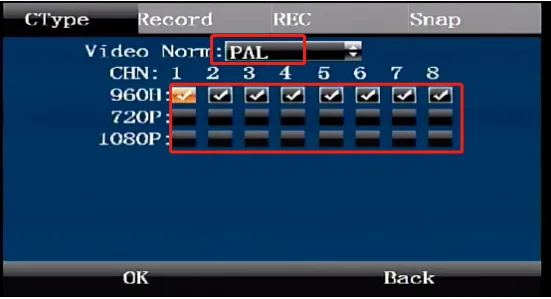
Remote control configuration method
Use the remote control to enter the device's settings menu, Recording Settings > Camera, as shown below For example, if channel 1 is connected to a 960 camera, please check 960H, if channel 2 is connected to a 720P camera, please check 720P, if channel 3 is connected to a 1080P camera, please check 1080P, and so on. Note: Please restart the device after saving the settings
Remote configuration method
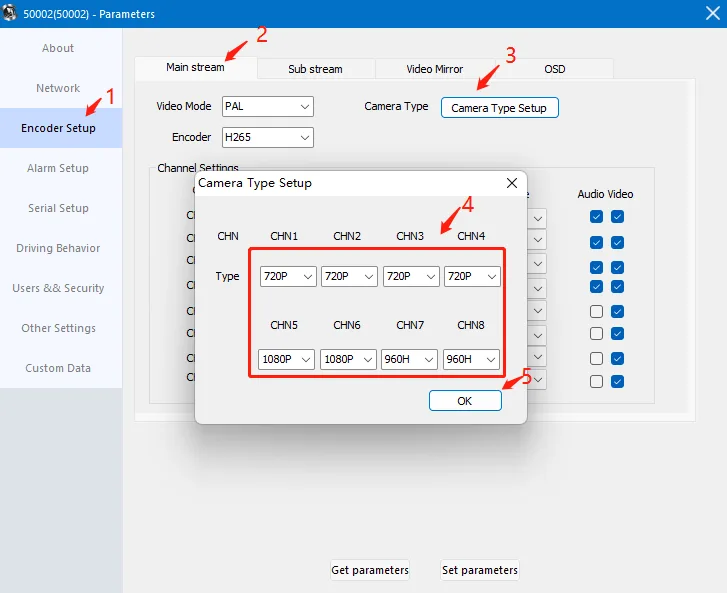
Right-click the online device on the client, click Parameter Configuration, and then follow the steps below
Click "Encoding Settings";
Click "Camera Type";
Select the type of channel to use;
After setting, click "Set Parameters";