Prerequisites:
- The device and computer are in the same LAN segment, and the computer can ping the local IP address of the device
- Or the device with WiFi module is switched to AP mode, and the computer connects to the AP hotspot to access the 192.168.42.100 address
Operation steps:
WEB login
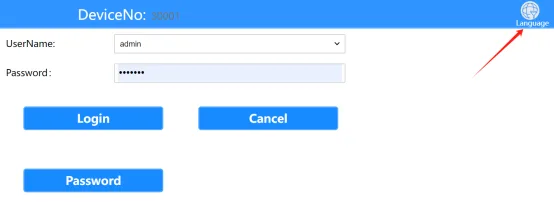
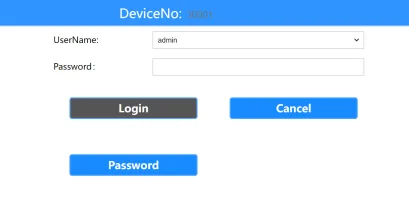
Open the computer browser and enter the local network IP address of the device or the AP hotspot address to come to the WEB login interface, fill in the login password "Adm_123" and click "Login" , refer to the "Function Usage" >>> "Network Function" article introduction for the local network IP address of the device

Enter the username and password on the login page to enter the settings page. The default username is: admin, and the default password is: Adm_123

WEB login password modification
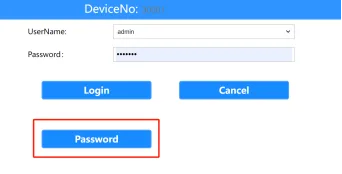
- Click Change Password on the login page>>Fill in the old password and the new password that meets the requirements>>Complete. If the password is successfully modified, please remember the modified WEB login password.
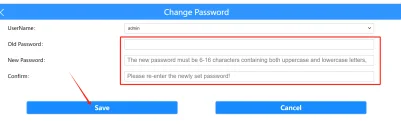
Change the language of the WEB system
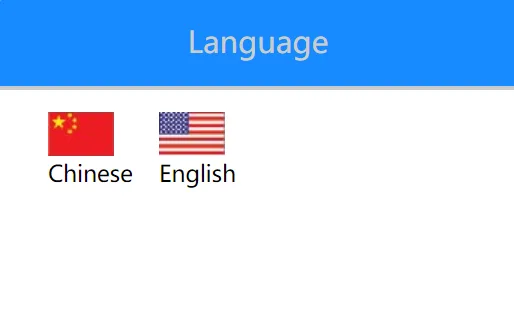
- Click Language Settings>>Select the language in the upper right corner to complete the language change.