Prerequisites:
- Display screen, remote control, matching IO expansion cable (some models come with it)
Note:
- M15Hv model ADC and IO input line share one, other models have separate ADC lines
- The number of ADC lines is defined according to the model. Some have two lines and some have one line. Please refer to the specifications of each model or ask our technical staff for details.
Operation steps
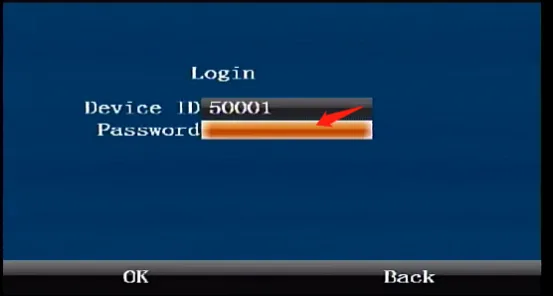
Press the remote control [ENTER] key to enter the login interface, enter the password "999999", and automatically log in to the main menu
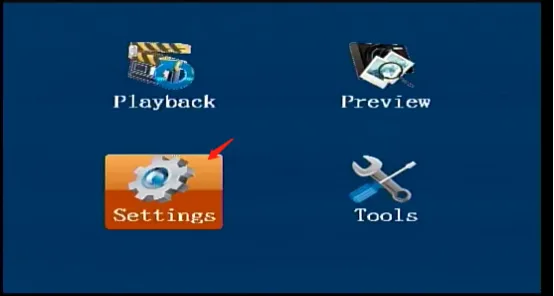
Select [Settings] in the main menu interface and press the "ENTER" key to enter the settings interface
 )
)
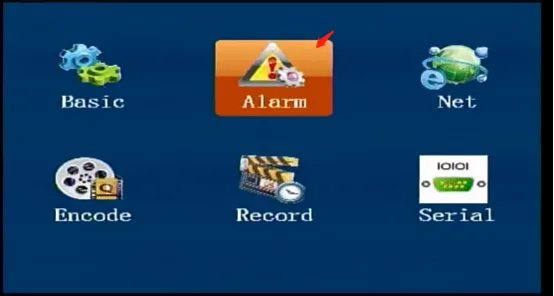
Select [Alarm] in the [Settings] interface, and press the "ENTER" key to enter the alarm settings interface
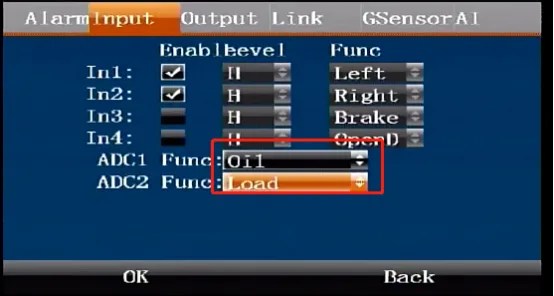
In the [Alarm Settings] interface, press the right arrow key to come to the [Input] interface, press the "ENTER" key to enter the editing state, press the down arrow key to move to the ADC function selection item, select the function, and confirm to save.