API - Plug-in Parameter Setting Interface
1. Overview
This API sends parameter or query commands to a specified vehicle device through the platform web interface, and returns the raw data reported back by the device. It is intended for remote configuration changes, firmware and model queries, and batch parameter adjustment.
2. Interface
| Item | Value |
|---|---|
| Endpoint | http://{platform-host}/StandardApiAction_deviceSetting.action |
| Method | POST |
| Content-Type | application/x-www-form-urlencoded |
URL parameters
| Parameter | Required | Description |
|---|---|---|
jsession |
Yes | Login session ID, obtained after signing in. Shown as XXX in all examples. |
DevIDNO |
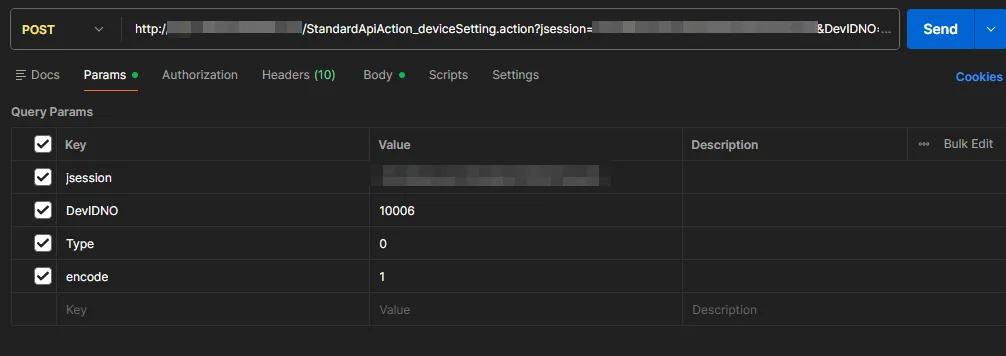
Yes | Device ID, e.g. 10006 |
Type |
Yes | Command type: 0 = set / send, 1 = read |
encode |
No | Set to 1 to enable encoding |
Body parameter
| Parameter | Required | Description |
|---|---|---|
json |
Yes | Command payload (URL-encoded). The value is the device protocol XML. |
3. About the session ID (jsession)
Every
XXXin this document stands for a real session ID. Replace it with your own value before use.jsessionis issued after signing in and acts as a login credential. It expires, and a new one must be obtained by signing in again. For details, see User Login and LogoffNever screenshot, forward, or publish a full URL that contains a session ID.
4. Request and response examples
Request
Query the device firmware version and model:
curl -X POST "http://{platform-host}/StandardApiAction_deviceSetting.action?encode=1&Type=0&jsession=XXX&DevIDNO=10006" \
  --data-urlencode 'json=<VariCfgSec Action="DEVICE_QUERY"><stVersion></VariCfgSec>'
Raw value of the json parameter (before URL encoding):
<VariCfgSec Action="DEVICE_QUERY"><stVersion></VariCfgSec>
Response
<?xml version="1.0" encoding="GBK" ?>
<VariCfgSec Action="DEVICE_QUERY" Result="1">
<stVersion Model="M52Hv" VideoCnt="9" strMcuVer="V010210" strFDTVer="VA20103"
 strUbootVer="V010107" strKernelVer="V010113" strRootfsVer="V010110"
 strAppVer="V010171" strDBVer="V010108" />
</VariCfgSec>
Postman Call


5. How to determine whether the command succeeded
Check two levels:
Platform level: an HTTP 200 response means the command was accepted by the platform and delivered to the device.
Device level: parse the
Resultattribute of<VariCfgSec>in the returned XML.Result="1"means the device executed the command successfully;Result="0"or any other value means it failed.Note: The
setting successpop-up only means the platform workflow has finished. It does not mean the device executed successfully. Always base your business logic on theResultattribute in the XML.
If the platform returns error information in JSON format, refer to the following result codes:
| result | Meaning |
|---|---|
0 |
Execution finished (does not mean the device succeeded) |
1 |
Execution exception |
3 / 7 |
Invalid parameter |
21 |
Device does not exist |
22 |
Device is offline |
23 |
Device is not responding |
6. FAQ
Q1: The page shows "setting success", but the Response box is empty.
The page front end reads the response as JSON by default, while the device actually returns XML, so the content may not be filled into the box. This does not affect command execution. To see the real response, press F12 to open the browser developer tools, find the request under Network, and check its Response tab.
Q2: The response contains garbled characters.
The device returns data in GBK encoding. If your program decodes it as UTF-8, text fields will appear garbled. Decode with GBK instead.
Q3: The API responds quickly, but the device does not execute the command.
First confirm that the device is online, then check whether DevIDNO is correct. An offline device returns 22; a device that does not respond returns 23.
Q4: The request reports a parameter error.
Check whether the json value is URL-encoded and whether the XML tags are properly closed. Type and DevIDNO are required.
7. Security notes
- Use the session ID only inside a trusted intranet environment or from a server-side call. Never expose it in plain text on a front-end page.
- Parameter setting is a device control operation. Validate on a single test device first and confirm
Result="1"before applying it in bulk.