National Standard GB28181--Parameter Issuance Registration Platform
Prerequisites:
- The device network can access the Internet normally, for example: 4G dial-up is successful or wired network routing is successful or WiFi connection is successful, refer to >>> "Network Function" article introduction!
Operation steps:
The device is issued through local tools, remote plug-ins, etc. For specific methods, refer to the "Function Use" >>> "Function--Configuration Tool" article introduction
Copy the first and second configuration parameters of the registration platform and issue them Register the basic parameters and the parameters of channels 1-4:
<VariCfgSec Action="DEVICE_SET">
<stGB28181 ucFD_Enable="1" ucFD_Version="1" ucFD_TcpSip="0" ucFD_TcpMedia="0" ucFD_AutoGps="0" ucFD_TalkChn="0" strFD_Manufacturer="BBC" strFD_ModelName="M51Hv" strFD_ServerIp="139.9.251.220" usFD_ServerPort="6608" strFD_ServerID="34017101041328000012" strFD_ServerDomain="8000012" strFD_DeviceId="281812016" usFD_DevicePort="5888" strFD_DeviceUser="34017101041328000012" strFD_DevicePass="123456"  >
<stGB28181SubID>
<SUBDEVID_0 strFD_LensId="34017101041328000012" />
<SUBDEVID_1 strFD_LensId="34017101041328000013" />
<SUBDEVID_2 strFD_LensId="34017101041328000014" />
<SUBDEVID_3 strFD_LensId="34017101041328000015" />
</stGB28181SubID>
</stGB28181>
</VariCfgSec>
Parameter Notes: ucFD_Enable="1":Function enabled and sub-stream uploaded;"0"Function disabled;"129"Function enabled and main stream uploaded ucFD_Version="1":GB28181 version 2022;"0" GB28181 version 2016 ucFD_TcpSip="0":sip UDP protocol;"1"sip TCP protocol ucFD_TcpMedia="0":media UDP protocol;"1"media TCP protocol ucFD_AutoGps="0":location data needs to be subscribed;"1"location data is sent automatically ucFD_TalkChn="0":voice channel auto;"1"voice channel CHN strFD_Manufacturer="BBC":device manufacturer strFD_ModelName="M51Hv":device model strFD_ServerIp="139.9.251.220":server IP or domain name usFD_ServerPort="6608":server port strFD_ServerID="34017101041328000012":server ID number strFD_ServerDomain="8000012":server domain strFD_DeviceId="281812016":device ID number usFD_DevicePort="5888":device port strFD_DeviceUser="34017101041328000012":authentication username strFD_DevicePass="123456":authentication password SUBDEVID_0 strFD_LensId="":configure the first channel ID number SUBDEVID_1 strFD_LensId="" configure the second channel ID number, and so on
Register the parameters of channels 5-8, and configure the "SUBDEVID_ " parameters according to the number of video channels of the device
<VariCfgSec Action="DEVICE_SET">
<stGB28181 StartChn="4" >
<stGB28181SubID>
<SUBDEVID_4 strFD_LensId="34017101041328000016" />
<SUBDEVID_5 strFD_LensId="34017101041328000017" />
<SUBDEVID_6 strFD_LensId="34017101041328000018"  />
<SUBDEVID_7 strFD_LensId="34017101041328000019"  />
</stGB28181SubID>
</stGB28181>
</VariCfgSec>
Query the basic registration parameters and the parameters of channels 1-4
<VariCfgSec Action="DEVICE_QUERY"><stGB28181></VariCfgSec>
Query the basic registration parameters and the parameters of channels 5-8
<VariCfgSec Action="DEVICE_QUERY"><stGB28181 StartChn="4"></VariCfgSec>
After the parameters are issued successfully, the device needs to be restarted for them to take effect
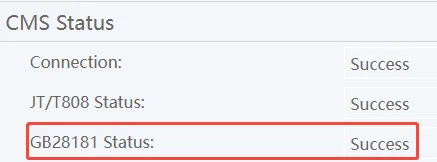
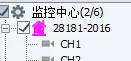
Enter the device system's WEB interface to check if the connection is successful, or check if the platform is online